Building RetroModem: Bringing Dial-Up Internet Back to Life
Project: RetroModem
Platform: Raspberry Pi / Linux
Author: S. M. Zaidi
Development log: July 2026 – Present
There is something uniquely nostalgic about the sound of a dial-up modem.
The dial tone. The DTMF digits. The ringing. Then that wonderfully awful burst of screeches, chirps and static before the computer finally announces:
CONNECT 33600
RetroModem began with a fairly simple idea:
Could a Raspberry Pi behave like a real dial-up modem well enough that an old computer could dial into it and reach the modern Internet?
The answer turned out to be yes.
But getting there involved serial ports, PPP, Asterisk, fake telephone numbers, modem command sets, GPIO buzzers, OLED displays, ALSA audio, vintage modem sounds — and considerably more debugging than the original idea suggested.
And that became half the fun.
July 2026 — The Experiment Begins
The project originally grew out of experiments with recreating a telephone/dial-up environment using a Raspberry Pi.
The first attempts involved Asterisk, SIP and real modem hardware. Asterisk 22.10.1 was compiled from source on the Raspberry Pi after the normal Debian package route proved problematic.
Eventually the Pi could answer calls and extensions could be dialled.
That proved the telephone side was possible.
But it also raised a more interesting question:
Did we actually need a complete telephone exchange just to make an old computer believe it was talking to a modem?
Probably not.
That led to RetroModem.
Instead of reproducing the entire telephone network, the Raspberry Pi itself would emulate the modem.
The First Modem
The basic architecture became:
Vintage PC
    │
    │ RS-232 / USB serial
    ▼
RetroModem
    │
    │ PPP
    ▼
Raspberry Pi
    │
    │ NAT
    ▼
Internet
The old computer sees what appears to be a conventional Hayes-compatible modem.
It can send familiar commands such as:
AT
ATZ
ATI
ATDT442708
RetroModem interprets those commands and responds as a physical modem would.
The number being dialled doesn't need to correspond to a real telephone line. RetroModem can map numbers to internal destinations.
The important thing is that, from the vintage computer's point of view, it just dialled a modem.
Getting PPP Working
The next major challenge was getting an actual network connection established.
After the simulated modem reports a connection, RetroModem releases the serial port and hands it to Linux pppd.
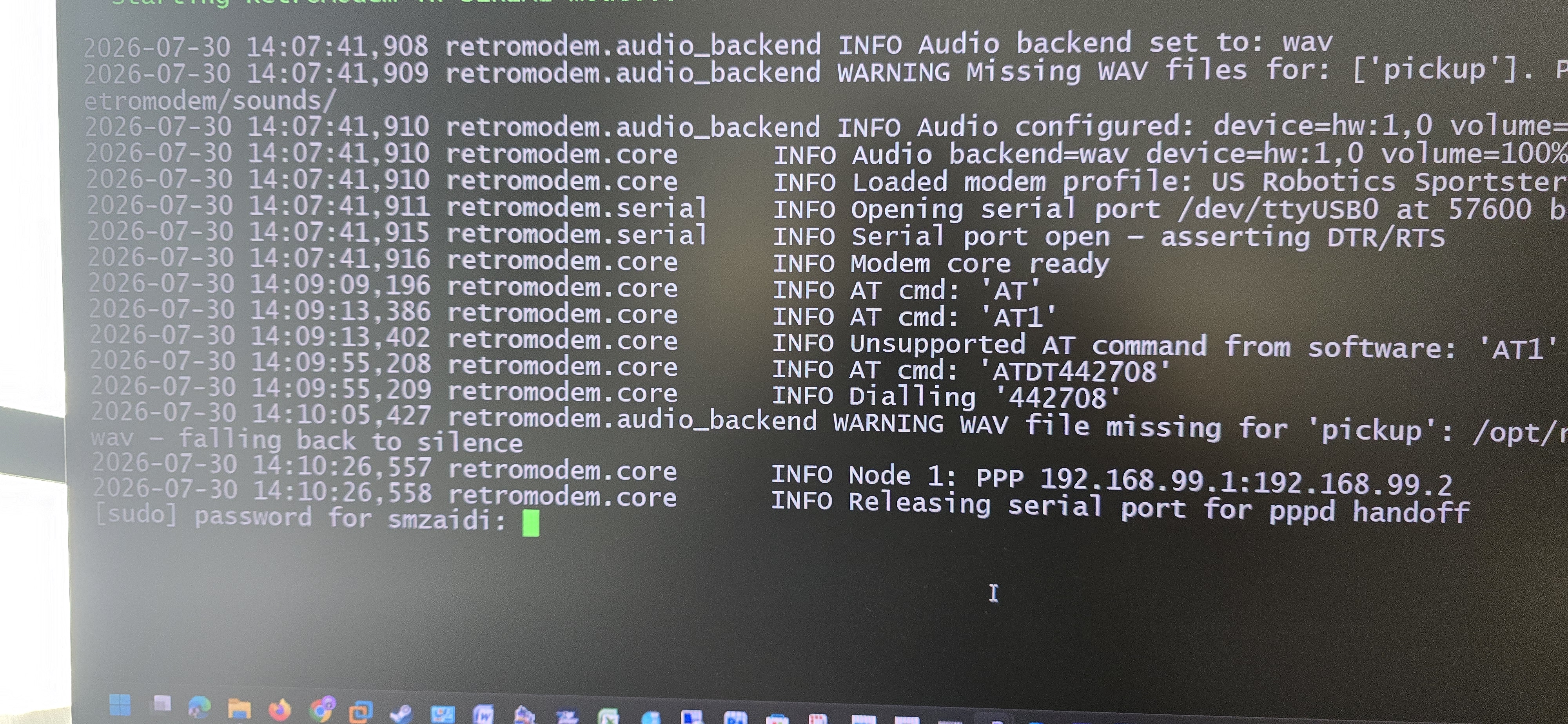
A successful connection eventually looked like:
Dialling '442708'

Node 1: PPP 192.168.99.1:192.168.99.2

Releasing serial port for pppd handoff

Starting pppd...

Node 1: PPP interface detected: ppp0

NAT enabled on wlan0
That moment was significant.
The vintage computer wasn't merely seeing a fake CONNECT message anymore.
It had a genuine PPP network connection through the Raspberry Pi.
RetroModem had effectively become a tiny dial-up ISP.
Making It Sound Like a Modem
Initially the project concentrated on functionality.
But a silent modem isn't much fun.
The next stage was recreating the sounds of a real telephone/modem connection.
A WAV audio backend was added with support for:
dialtone.wav
ring.wav
busy.wav
handshake.wav
pickup.wav
hangup.wav
no_carrier.wav
relay_click.wav
We also generated DTMF tones corresponding to the telephone number being dialled.
The sound generator was deliberately made slightly imperfect.
Instead of mathematically pristine digital tones, the generated audio included:
- slight telephone-line hiss
- softer attack and decay
- level matching
- subtle analogue character
The objective wasn't laboratory accuracy.
It was to make it feel like a telephone line.
The Missing Ringing Problem
One amusing bug appeared once the audio system was working.
RetroModem would:
dial number
→ handshake
→ CONNECT
Something felt wrong.
Then it became obvious.
Nobody had answered the telephone.
A real dial-up call normally sounds more like:
dial tone

DTMF digits

ring...
ring...

click

modem handshake

CONNECT
The dial engine was therefore changed so that the remote modem answers after approximately two or three rings.
It is a completely unnecessary delay from a networking perspective.
And completely essential from a retro-computing perspective.
Two Audio Systems
RetroModem also developed two different ways of producing sound.
A GPIO buzzer could generate simple tones, while the WAV backend could reproduce much more convincing telephone and modem audio through the Raspberry Pi's audio output.
The launcher therefore gained selectable audio backends.
That eventually exposed another problem.
The launcher could ask for an ALSA device, but presented choices such as:
hw:1,0
Technically correct.
Humanly useless.
The interface was changed so the user could instead select something understandable such as:
3.5mm / Line Out
HDMI Audio
RetroModem could deal with the ALSA plumbing underneath.
Why Is "Maximum" So Quiet?
Another audio problem appeared soon afterwards.
The launcher reported:
Volume: Maximum
Yet the modem was surprisingly quiet.
Opening alsamixer revealed why.
RetroModem's software volume was at maximum, but the actual ALSA hardware mixer wasn't.
The volume system was redesigned so presets controlled both the hardware mixer and software amplification:
| Preset | ALSA mixer | Software gain |
|---|---|---|
| Quiet | 40% | 100% |
| Normal | 70% | 110% |
| Loud | 90% | 120% |
| Very Loud | 100% | 140% |
| Maximum | 100% | 180% |
Now selecting Maximum actually meant maximum.
A revolutionary concept. 😉
Adding an OLED
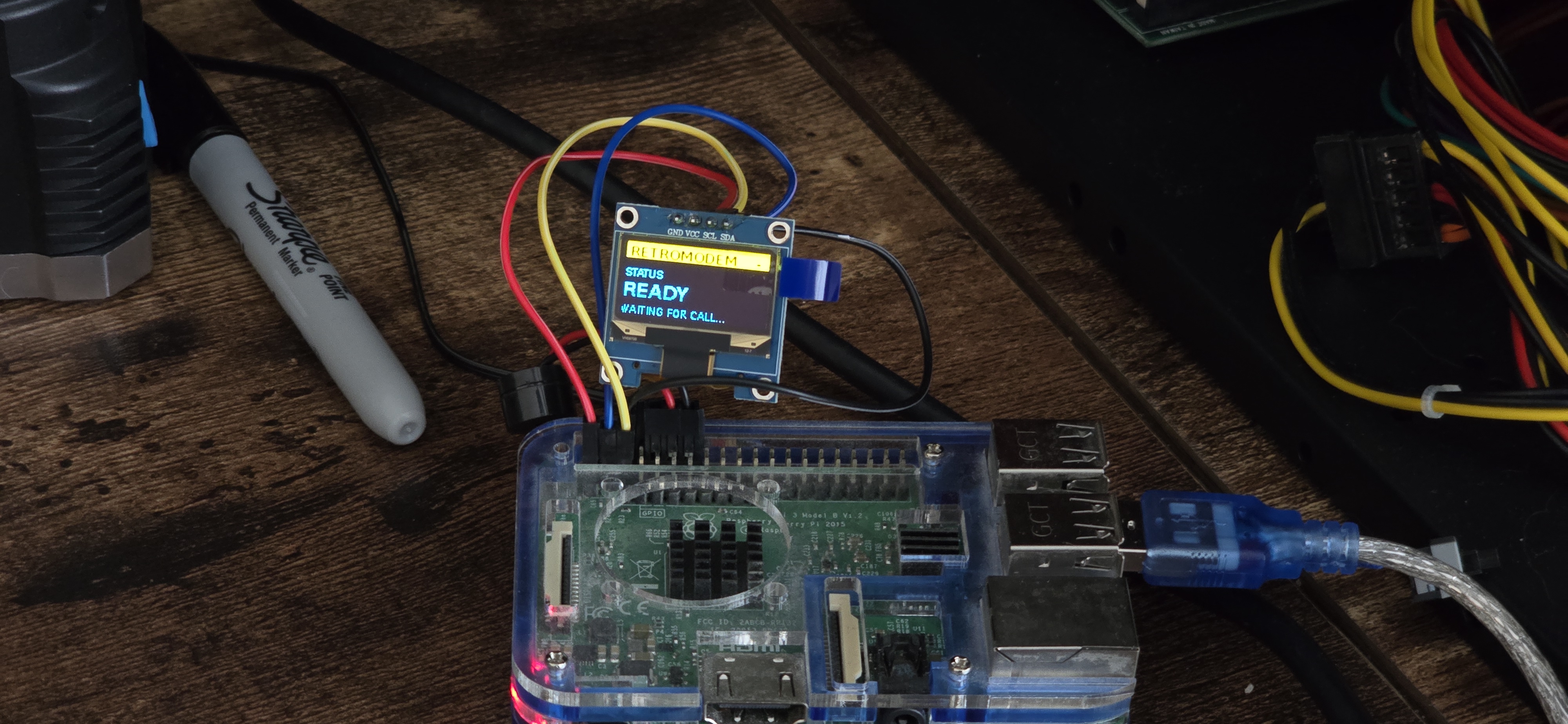
An SSD1306 OLED display was added to give the physical RetroModem some personality.
Early experiments weren't especially glamorous.
There were Python syntax errors, library API mismatches and refresh-performance problems.
Eventually the display became useful for showing things such as:
READY

DIALING
442708

RINGING

CONNECT
33600

ONLINE
and live connection information.
The OLED turned the Raspberry Pi from a box running Python into something that actually looked like a modem appliance.
A Boot Personality
Once the OLED and audio systems existed, another idea followed naturally.
Why shouldn't RetroModem have a startup sound?
The proposed sequence became:
♪ chime ♪

"Welcome to RetroModem... by S. M. Zaidi."
It's unnecessary.
Which is precisely why it belongs in a retro hardware project.
July 30, 2026 — A Much Bigger Idea
By this point RetroModem was behaving convincingly like a US Robotics Sportster 56K.
Commands such as:
ATI
ATI0
ATI1
ATI3
ATI5
ATI6
ATI7
AT&V
AT%V
AT+MS?
could return US Robotics-style responses.
But this exposed an architectural problem.
The emulator wasn't really emulating modems.
It was emulating one particular modem.
US Robotics-specific behaviour had gradually found its way into modem_core.py.
So the project took another turn.
Instead of one modem emulator, RetroModem would become a modem emulation framework.
Introducing Modem Profiles
A new structure was created:
modem_profiles/

    __init__.py
    base.py
    usr.py
    hayes.py
Every modem personality inherits from a common ModemProfile.
The US Robotics implementation became:
USRProfile
while a second personality was introduced:
HayesProfile
The intention is simple.
The core should handle:
Serial
PPP
Networking
Dialling
Audio
OLED
Connection state
The profile should handle:
Identity
ATI responses
Vendor AT commands
S-register defaults
Factory configuration
Modem personality
The core shouldn't care whether it is pretending to be a US Robotics modem, Hayes modem or anything else.
July 30, 2026 — First Profile Test
The first major test succeeded.
RetroModem started with:
Loaded modem profile: US Robotics Sportster 56K
The existing USR ATI commands were moved into usr.py.
Then the computer dialled:
ATDT442708
RetroModem answered, performed the simulated telephone sequence, started PPP and produced:
ppp0
NAT came online.
Nothing broke.
That was important because it proved the profile architecture could sit above the existing dial/PPP engine without interfering with it.
Where the Project Is Now — August 2026
The current refactor is removing the last US Robotics-specific behaviour from modem_core.py.
The target architecture is:
                    RetroModem
                        │
                ┌───────┴────────┐
                │                │
           Modem Core       Modem Profile
                │                │
        Serial / PPP          USR
        Networking            Hayes
        Audio                 Supra
        OLED                  ZyXEL
        Dial engine           Telebit
Selecting:
modem_profile = usr
will emulate a US Robotics Sportster.
Changing it to:
modem_profile = hayes
will emulate a Hayes modem.
The same serial connection.
The same PPP engine.
The same Raspberry Pi.
A completely different modem personality.
What's Next?
The immediate milestone is straightforward:
Remove every remaining US Robotics-specific assumption from modem_core.py.
Then both US Robotics and Hayes profiles will be tested against the same core.
Once that works, adding another modem should no longer mean rewriting RetroModem.
It should mean adding another profile.
And that opens up a rather entertaining possibility:
US Robotics Sportster
US Robotics Courier
Hayes Smartmodem
Hayes Optima
SupraFAXModem
ZyXEL
Telebit
MultiTech
Zoom
One Raspberry Pi.
A shelf full of virtual modems.
Development Log
I would keep a permanent section at the bottom of the page and add to it whenever we make a meaningful change:
July 2026 — Initial experiments: Asterisk/SIP experiments, serial modem communication and PPP testing.
Late July 2026 — RetroModem core: Hayes-compatible AT command interpreter, serial transport, PPP handoff and Internet NAT established.
Late July 2026 — Audio: Added buzzer and WAV backends, DTMF dialling, dial tone, ringing, busy tone, handshake and disconnect sounds.
Late July 2026 — Physical UI: SSD1306 OLED integrated with modem state and connection information.
30 July 2026 — Audio overhaul: ALSA output selection and combined hardware/software volume presets added.
30 July 2026 — Telephone simulation: Added realistic dial → ring → answer → handshake sequence.
30 July 2026 — Modem personalities: Introduced ModemProfile, USRProfile and HayesProfile architecture.
30 July 2026 — First profile migration: ATI0–ATI7 and US Robotics configuration commands successfully moved from the core into usr.py.
30 July 2026 — PPP regression test: US Robotics profile successfully dialled and established ppp0; Internet NAT remained operational after the architectural changes.
1 August 2026 — Profile refactor: Work begins on completely removing US Robotics-specific implementation from modem_core.py and establishing USR and Hayes as independent personalities.
Next: Complete USR extraction → test Hayes → make profile selection persistent in the RetroModem launcher.
------------------------------------------------------------------------------------------------------------
1 August 2026 — MyRetroCorner.uk Is Born
Today marks another milestone — myretrocorner.uk officially came to life.